Friday, March 6, 2009

Thing #13

I love the Spell with Flickr Tool! It is so much fun to make unique signs and words! I've seen our preacher at church use these letters for his powerpoint notes, but never knew where they came from! I used them to spell out the kid's names! Aren't they cute! This would be a great way to spice up presentations that I give! I will have to work on the formatting to make them smaller to fit on my blog without going to a second line, but you get the idea!


m is for merly letter E L Letter A y McElman_071026_2450_N letter A


Capital Letter M (Silver Spring, MD) A R S H for HYUNDAI Letter A Wood Type L letter L

I also played with the smiley face feature! I created a seasonal smiley that I could add to the bottom of my emails! I've seen several people in the district have these cute little icons attached. I always have a seasonal antenna topper and the kids love it! Maybe I should add this to my emails and make others smile!


Another really fun tool was the trading card maker! I'm not sure what all I could do with this tool, but it was fun to make!

Thursday, March 5, 2009

Thing #12

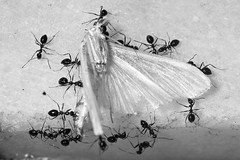
After reading a really good blog post referenced by my friend, techsploringprincipal, called the Beware of the Ants of Annoyance and then the teamwork picture by Macropoulos from Thing#11, I've decided to create a slide show dedicated to the hard working teams of ants that work together day in and day out! So thank you ants for all you've done to inspire me lately!


Thing #11

This year, our campus has chosen the them, "Champions of Success." As we were involved in our first round of testing this week, I was reminded of all the "little" things that got us where we are! We've also chosen to talk about teamwork and everyone doing their part to help us reach that Exemplary Level that we are striving for. So I wanted to inspire the teachers and students this week, as I already spoke about in Thing#10. I didn't have much luck finding a video, but I found a picture that says a thousand words using Flickr.

Teamwork by marcopaulo

The task of these ants was monumental! They had to conquer something so huge, at least 100 times their size. Yet, they didn't do it alone. All of the ants came together to move this moth back to their colony! Amazing the task at hand and the teamwork it took to get it done!

Flickr is a great way to find some amazing resources. I'm always hunting clip art for various things and yet never ever thought to look in such a place - just figuring anything outside of Microsoft Office was probably covered by that C guy and I'd get in trouble by someone for using it!

I spent some time looking at the lesson plans. I had a student this week on TAKS writing that literally sat for more than 9 hours without writing a single thing on his paper because he couldn't "think" of anything to write about. I thought what are we doing to our kids... this writing thing is so hard for them. As I explored Flickr, I saw a really cool link. Story Telling in 5 pictures. Some people are so creative. Here is a link to my favorite story that I saw. Chores. Perhaps it's my favorite because I've spent the better part of my day doing tons of chores - this story makes it seem so easy!

Could we use these Flickr pictures to inspire our kids to write! How amazing it might be!

Sunday, March 1, 2009

Thing #10

Creative Commons! What a really neat idea! It seems so "anti -current-culture". You know what I mean? Everyone is out to create something that is theirs to make money and yet it seems to be a whole world of people willing to share? Is that really possible?

The possibilities of this "willingness to share" seem so exciting and such a relief! Now don't tell my mom, but I'm not a huge fan of copyright and often turn my head the other way when copyright issues come about! I understand the need, but it is so constricting! It really gets in the way of school so often! I won't do anything blatantly against copyright, but I don't always check into the "C" of something before using it!

I've never noticed a "cc" on any document, or maybe I have and turned the other way not knowing that I didn't have to! I'll certainly start keeping my eye out for it, now! Move on over Mr. Big C, I've got a new best friend!!

-S-T-R-E-T-C-H- -M-E-
I visited the OER website which I learned was the Open Educational Resources Site. I was looking for some "motivating video" to show my students before TAKS about believing in themselves, and all that other good stuff. While I didn't find anything fitting that specific content, I kept following all these links to great lessons! What fun! The Ooblek lesson was there along with other old faithfuls as well as lots of new ones! I wonder if our curriculum departments have spent anytime here? What a great resource!

Monday, February 23, 2009

Thing #9

Creating the wiki wasn't too bad. It was a lot more fun to make them than to read them. I can see where the usefulness might be for collaboration. The formatting still seems a bit primitive, maybe that's because we are using a free wiki site. Embedding the text and pictures didn't allow for all of the same freedoms that you might get in word. Oh well, if that's the only complaint, I guess it's pretty cool.

I like the idea of the sandbox - a "closed" place to post wikis. I wonder what it would take to set up a school sandbox and allow parents to see it, but teachers to edit it? Could this take the place of my school website? Wouldn't that be helpful. I guess I could add that to my burning questions!

Thursday, February 19, 2009

Thing #8

Wiki............hmmmmm..............

I understand what a wiki is. I see it's potential in the classroom! What is frustrating or maybe disappointing is the outside looking in final project. I love how the wiki's allow for collaboration and growth in the production, but in the end, the final products appear to be more like an informational website - ho hum...

Now, if I were using this in my class, such as CoolCat Teacher did, I am sure that my passion for the topic and the tool would be MUCH more enthusiastic.

I visited the Kindergarten Counting Book Wiki. The end result just looked like a website with pictures on it. However, I'm sure that during the creation of this counting expedition the teacher and students were so excited about getting to use an interactive technology tool. So, as I said before, from the outside looking in, this isn't very exciting. Maybe if I could just muster up the strength to start one for my school, I could find infinite uses for the wiki!

I did visit the Primary Math wiki and then branched off into one of the first grade blogs. It was a very current blog that showed what the students were actually learning. Again, this was a blog and not a wiki. The actual wiki was a place where each of the classrooms posted the link to their blog.... I think I like the blogging much better - I always end up there!

The Schools in the Past wiki was kind of neat, allowing teachers, parents, grandparents and students to all give input in real time on one document for all to see. I thought that was a neat way to use the technology!

I struggle with ideas about how to use this with my school, right now. Maybe more ideas will come to me as I view more and more of them!

Tuesday, February 17, 2009

Thing #7a

Well, I can't tell you how stressed this makes me to post outside of the "things" and therefore, get my list of entries out of order... yes, I know obsessive compulsive! Anyway - I just had to blog about what I learned today. I'm still playing with Things 3 and 4... can't move on to Things 8 and 9 yet! Too much to do!

My friend, IB2, (teacher at my school and member of our 23 things class) taught me how to get a cool new background on my blog. He also taught me how to put my family blog and my school blog all on one dashboard so that I don't have to keep logging in and out with the two different accounts! Isn't that awesome?

So here's the deal... Go to this link and you will be able to see tons of free backgrounds for your blog! I spent hours playing with and picking out new backgrounds for my blog. I might even change them with each post! There are fun "seasonal" backgrounds, traditional or conservative, wild and crazy and even a few just plain weird backgrounds! I hope you enjoy this little link! I sure did! Thank you IB2 for the hints and tips! I'm glad that I still have face to face friends that teach me things! I'm not sure what I would do if everyone were only virtual! :-)

Enjoy the new backgrounds and try not to harass me about my OCD! I know... I have issues! Getting things in "order" is just the beginning! Explains alot about me, doesn't it!